
Developers and build pipelines
Normalize contributor clips, shrink CI artifacts that include screen captures, and produce consistent preview assets for web and docs.
download-handbrake.com
Convert from nearly any common format into modern, widely supported codecs. Ship smaller files, predictable compatibility, and consistent quality using presets you can trust.
Community maintained, cross platform, and transparent about what HandBrake can and cannot do.

HandBrake is an open source tool, built by volunteers, for converting video from a broad range of sources into a selection of modern codecs. It is widely used when you need MP4 or MKV outputs, predictable device compatibility, and repeatable encoding settings across Windows, macOS, and Linux.
HandBrake emphasizes practical controls: presets for fast starts, detailed panels when you need them, batch queues for multi title work, and filters for cropping, scaling, and cleanup. It is not a full non linear editor, and it is not designed to defeat copy protection.
Start with presets, then graduate into precise tuning. Each card links to the full feature breakdown.
Fast starts for common targets, plus room to save your own tuned profiles.
Read more
Crop, scale, deinterlace, and clean up sources before the encode commits.
Read more
Line up jobs, iterate safely, and keep throughput predictable on long runs.
Read more
Product imagery
Layout studies from the site media folder. Tap or click any frame to view it enlarged.
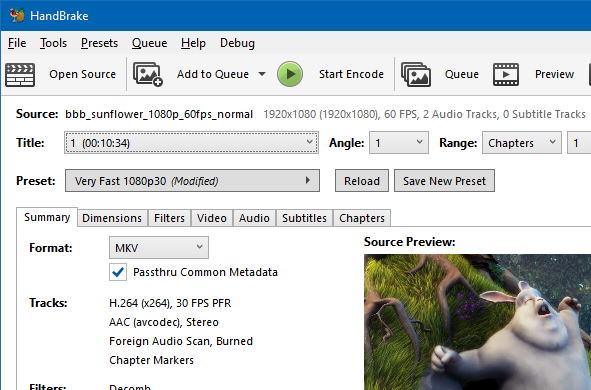
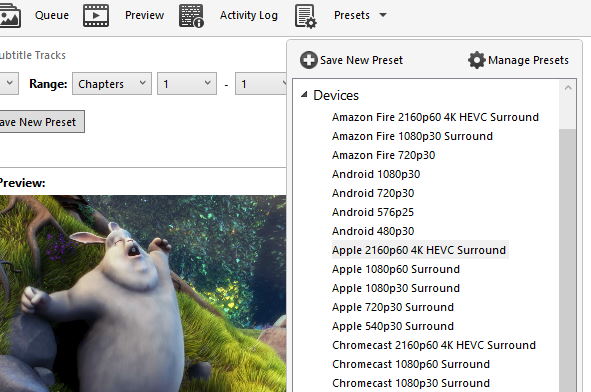
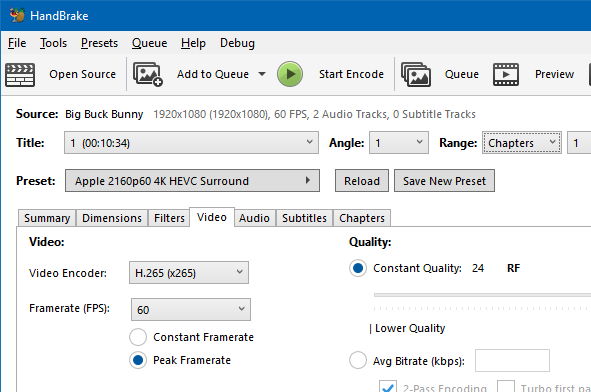
Normalize contributor clips, shrink CI artifacts that include screen captures, and produce consistent preview assets for web and docs.
Standardize desktop encoding guidance, reduce help desk variance, and document a single supported path for internal training videos.
Produce masters that are easier to store, create device friendly renditions, and keep subtitles and chapters organized when the source allows it.
HandBrake sits in a crowded category. This preview highlights typical tradeoffs without endorsing any single vendor workflow.
| Capability lens | HandBrake | General purpose converter suites | Professional NLE export |
|---|---|---|---|
| Primary focus | Transcode and compress with transparent codec controls | Broad format coverage with variable depth of expert panels | Editorial storytelling first, export is one stage among many |
| Learning curve | Friendly presets, advanced panes when you need them | Often simpler UI, sometimes fewer engineering grade diagnostics | Steeper overall, because editing and finishing are bundled |
| Batch throughput | Strong queue workflows for repetitive jobs | Varies widely by product and automation hooks | Strong, but tied to project complexity and timelines |
If you need copy protected media support, plan a lawful upstream workflow. HandBrake does not remove copy protection for you.
HandBrake is developed in the open, with verifiable releases and a long public track record. Integrity practices matter: verify hashes when you mirror builds internally, teach users how to spot unwanted bundlers, and prefer official distribution paths you control.
This resource is written for decision makers who need a calm, structured explanation of capabilities, limitations, and safe acquisition practices. Read release notes before upgrades.
Illustrative excerpts from historic user posts on public software listings. Spelling lightly normalized; opinions belong to the original authors, not download-handbrake.com.
Anonymous user
April 20, 2020
It is a good software for reducing file sizes, but I am disappointed that it is more NTSC than PAL format. I wanted to convert my file sizes to Fast 1080p25 and it only has Fast 1080p30. The next preset is Very Fast 576p25 which is not good enough for me since I am in a PAL region. I hope you will take this into consideration. Believe me, it is a good software.
Anonymous user
September 19, 2019
It is so good and helps to reduce a bulky video so that storage and upload time are not big issues.
Anonymous user
June 16, 2013
Worked flawlessly for me till recently. Updated to the latest version recently, but since then some DVD output files are broken up into a mosaic pattern with broken sound. Grateful for a fix!
Anonymous user
January 28, 2013
HandBrake is a fantastic video converter of all time. HandBrake is a fantastic free tool MPEG converter for any kind of work, which is really fantastic. All my headaches have been resolved with HandBrake. Besides it is simple to use, a fast converter, free, and with preset options. From now on I must not worry about video conversion. Thanks to the developer and the beauty of Softonic.
Anonymous user
July 19, 2012
HandBrake has performed flawlessly for me and it is free. It is better if you know a bit about what you are doing first, but with a bit of research and a bit of trial and error, I have been getting great HD rips from Blu-ray. It does not remove copy protection, however, so you will have to use another tool to do that. Pros: great quality output, every setting I could want. Cons: can be a bit overwhelming if you are not experienced at ripping.
These are intentionally short. Expand a question here, then continue on the dedicated FAQ page for legal, security, and workflow depth.
Security tools sometimes flag legitimate packers and fast moving binaries. Prefer official builds, verify hashes, and follow your organization’s software allow list process.
No. HandBrake is not a copy protection removal tool. You must lawfully prepare media before HandBrake can encode it.
Video encoding has real parameters: frame rates, PAR, filters, and rate control. Presets help, but understanding your source removes guesswork.
Download the latest release for your platform, verify integrity, and share the guides with your team.
